






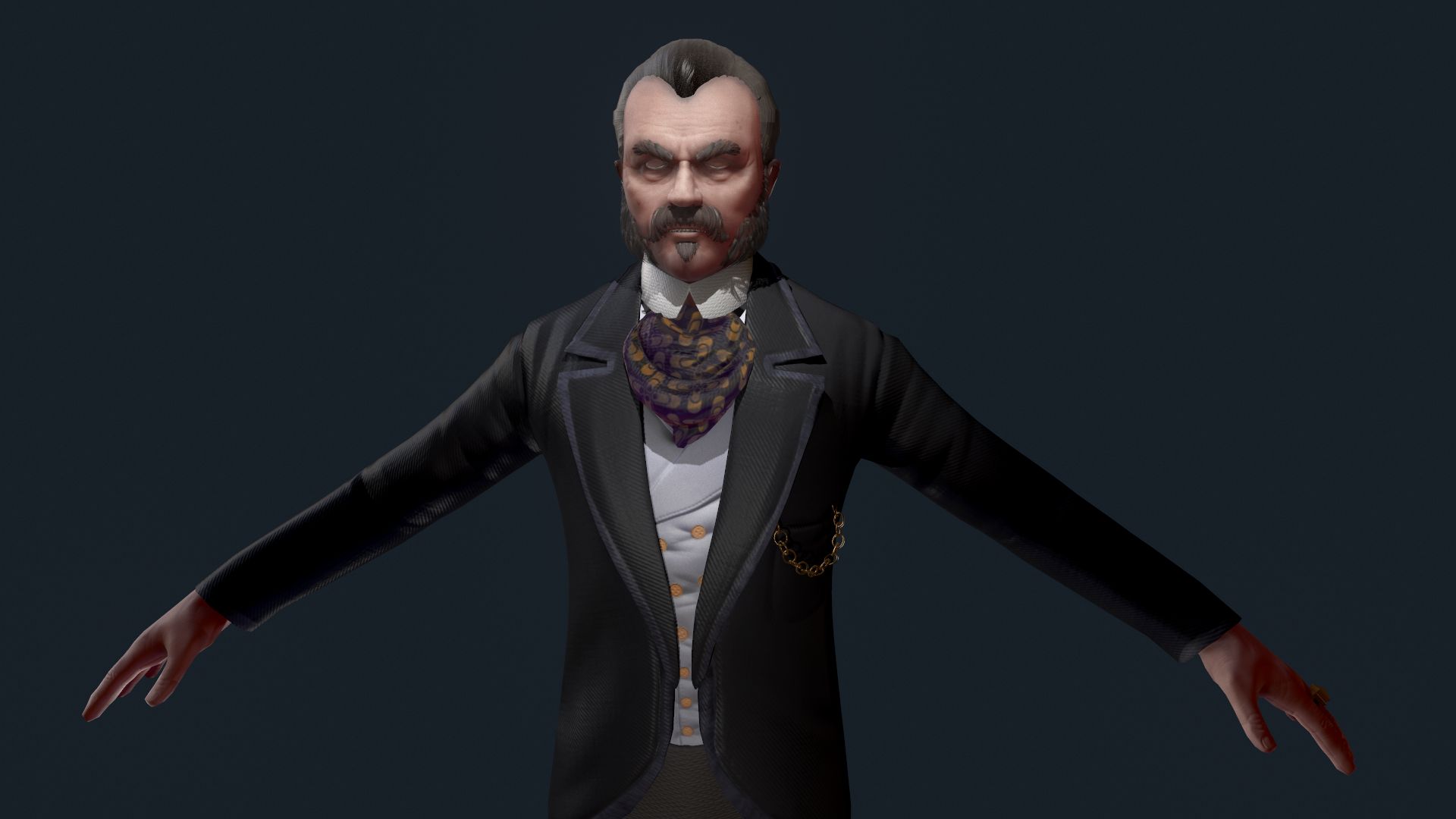


Victorian Gent-Rigged-1モデル2バージョン 3Dモデル
0


0
訪問

から提出された
r189
仕様
- ジオメトリpolygonal_quads only
- 多角形11,764
- 頂点12,265
- テクスチャYes
- 堅いYes
- アニメ化Yes
- 3Dプリント可能No
- ゲームレディ(低ポリ)No
- UVマップYes
- ラップされていないUVnon-overlapping
説明
Victorian Gent - Rigged - one model 2 versions
Victorian Gent - one model 2 versions Rigged and Animated for Lightwave version 11.6 and up and for 3DS Max version 8.5 and 3DS Max 2017 and up
This model comes with several pre-animated scenes to get you started:
Man8_VG2_Zero_Fin (base T-Pose and Rigged Scene)
Man8_VG2_StartWalk-Fin
Man8_VG2_WalkCane_Fin
SIG_VG_Both_01
In Lightwave “VG-MainLayer” moves the entire rigged object
In Max the “LOC-POINT” moves the entire rigged object
MAX: The main controlling Object “CtrlC_COG” attached to "ROOT" bone
LW: The main controlling Bone is the "ROOT" bone
Max: The feet and legs are controlled by "LT-Foot" and "RT-Foot" objects respectively. When you select a foot controller in Max under the “Modify” menu you will find “Custom Attributes” which have Heel To and Ball of foot controls.
LW: The feet and legs are controlled by "LT-Foot" and "RT-Foot" bones respectively. LW has “Lt_ToeControl” and “RT_ToeControl” for horizontal toe control - LW Also has “LT_OnToes” and “RT_OnToes” to rock toes up
Max: The hands are controlled by the “CtrlC_LT_Hand” and “CtrlC_RT_Hand” objects
LW: The hands are controlled by the “LT_Hand” and “RT_Hand” Bones
Max: the Knees and Elbows are managed by “CtrlC_LT_Elbow”and “CtrlC_RT_Elbow” and “CtrlC_LT_Knee” and “CtrlC_RT_Knee” objects
LW: the Knees and Elbows are a bit different and are managed by “LT_Shoulder” and “RT_Shoulder” and “LT_Knee_Rotate” and “RT_Knee_Rotate” objects - a bit tricky at first, but you’ll get the hang of it
Max: The Head, Neck, shoulders, fingers and spine(s) all have their own bones as controllers
LW: The Head, Neck, shoulders, fingers and spine(s) all have their own bones as controllers
The eyes have bone control for position or you can use the Eye morphs to control position.
The Z-RT_ThickFingers morphs are to make the fingers thicker while using bones to form the hand into a fist. The bones tend to make the finger thinner when bent to extremes - these morphs are intended as a fix for that.
The Top Hat and Walking stick are optional (their visibility can be turned on or off as desired).
There are 53 morphs in this object - 8 of them are Phoneme controls:
0-A, 0-CDGJKNSTYZ, 0-Closed, 0-E, 0-FV, 0-LT, 0-MBP, 0-O, 0-U, 0-WQ, CheeksPuffed, Eyebrow-Arch-LT, Eyebrow-Arch-RT, Eyebrow-DN-LT, Eyebrow-DN-RT, Eyebrows-DN-Both, Eyebrows-IN-Both, Eyes-DN, Eyes-LT, Eyes-Open-Wide, Eyes-Open, Eyes-RT, Eyes-Up, HandsSmaller, Jaw-Back, Jaw-DN, Jaw-Forward, Jaw-LT, Jaw-RotateZ-LT, Jaw-RT, Lip-Lower-In, LT_BootBack-DN,, MidMouth-LT, MidMouth-RT, Mouth-DN, Mouth-Frown, Mouth-Open-Wide, Mouth-Open.lwo
Mouth-RotateZ-RT, Mouth-Up, Mouth-Whistle, Nose-Scrunch, RT_BootBack-DN,, Smile, Snarl-LT, Snarl-RT, Squint, UpperLip-IN, UpperLip-OUT, Z-LT_ThickFingers, Z-RT_ThickFingers, Fatsuit, Thinsuit, Z-THinner
But if you have positioned the model by moving the bones, AND you try to use some morph targets, you may have some pretty weird distortions that will freak you out.
Don't panic, the solution is to 'zero' out your bone positions, as or just before you apply the 'Morph' targets.
------------------------
See Readme for full information
Victorian Gent - one model 2 versions Rigged and Animated for Lightwave version 11.6 and up and for 3DS Max version 8.5 and 3DS Max 2017 and up
This model comes with several pre-animated scenes to get you started:
Man8_VG2_Zero_Fin (base T-Pose and Rigged Scene)
Man8_VG2_StartWalk-Fin
Man8_VG2_WalkCane_Fin
SIG_VG_Both_01
In Lightwave “VG-MainLayer” moves the entire rigged object
In Max the “LOC-POINT” moves the entire rigged object
MAX: The main controlling Object “CtrlC_COG” attached to "ROOT" bone
LW: The main controlling Bone is the "ROOT" bone
Max: The feet and legs are controlled by "LT-Foot" and "RT-Foot" objects respectively. When you select a foot controller in Max under the “Modify” menu you will find “Custom Attributes” which have Heel To and Ball of foot controls.
LW: The feet and legs are controlled by "LT-Foot" and "RT-Foot" bones respectively. LW has “Lt_ToeControl” and “RT_ToeControl” for horizontal toe control - LW Also has “LT_OnToes” and “RT_OnToes” to rock toes up
Max: The hands are controlled by the “CtrlC_LT_Hand” and “CtrlC_RT_Hand” objects
LW: The hands are controlled by the “LT_Hand” and “RT_Hand” Bones
Max: the Knees and Elbows are managed by “CtrlC_LT_Elbow”and “CtrlC_RT_Elbow” and “CtrlC_LT_Knee” and “CtrlC_RT_Knee” objects
LW: the Knees and Elbows are a bit different and are managed by “LT_Shoulder” and “RT_Shoulder” and “LT_Knee_Rotate” and “RT_Knee_Rotate” objects - a bit tricky at first, but you’ll get the hang of it
Max: The Head, Neck, shoulders, fingers and spine(s) all have their own bones as controllers
LW: The Head, Neck, shoulders, fingers and spine(s) all have their own bones as controllers
The eyes have bone control for position or you can use the Eye morphs to control position.
The Z-RT_ThickFingers morphs are to make the fingers thicker while using bones to form the hand into a fist. The bones tend to make the finger thinner when bent to extremes - these morphs are intended as a fix for that.
The Top Hat and Walking stick are optional (their visibility can be turned on or off as desired).
There are 53 morphs in this object - 8 of them are Phoneme controls:
0-A, 0-CDGJKNSTYZ, 0-Closed, 0-E, 0-FV, 0-LT, 0-MBP, 0-O, 0-U, 0-WQ, CheeksPuffed, Eyebrow-Arch-LT, Eyebrow-Arch-RT, Eyebrow-DN-LT, Eyebrow-DN-RT, Eyebrows-DN-Both, Eyebrows-IN-Both, Eyes-DN, Eyes-LT, Eyes-Open-Wide, Eyes-Open, Eyes-RT, Eyes-Up, HandsSmaller, Jaw-Back, Jaw-DN, Jaw-Forward, Jaw-LT, Jaw-RotateZ-LT, Jaw-RT, Lip-Lower-In, LT_BootBack-DN,, MidMouth-LT, MidMouth-RT, Mouth-DN, Mouth-Frown, Mouth-Open-Wide, Mouth-Open.lwo
Mouth-RotateZ-RT, Mouth-Up, Mouth-Whistle, Nose-Scrunch, RT_BootBack-DN,, Smile, Snarl-LT, Snarl-RT, Squint, UpperLip-IN, UpperLip-OUT, Z-LT_ThickFingers, Z-RT_ThickFingers, Fatsuit, Thinsuit, Z-THinner
But if you have positioned the model by moving the bones, AND you try to use some morph targets, you may have some pretty weird distortions that will freak you out.
Don't panic, the solution is to 'zero' out your bone positions, as or just before you apply the 'Morph' targets.
------------------------
See Readme for full information
Nov 13, 2021
追加日
Nov 13, 2021
最後の更新
レビュー
この商品のレビューはまだありません。
氷を砕いた最初の人になろう。