






Crab 3D 모델
0


916
방문

에 의해 제출 된
yourTurboModeler
명세서
- 기하학polygonal_quads only
- 다각형6,470
- 정점들6,500
- 텍스처Yes
- 딱딱한Yes
- 생기 있는Yes
- 3D 인쇄 가능 준비No
- 게임 준비 (낮은 폴리)No
- UV 매핑 됨Yes
- 포장되지 않은 자외선non-overlapping
기술
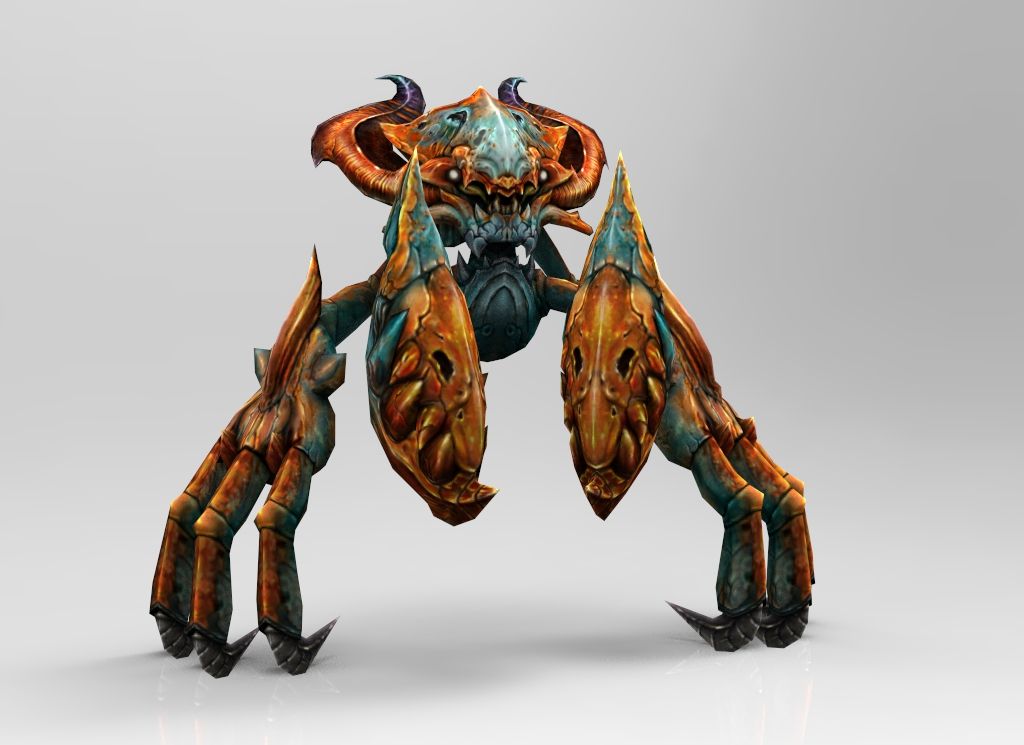
This is a model of a crab.
Model is rigged for full animation.
There are two Maya files included, one with a simple walk cycle
and turntable and another with no animation and all controls
set to 0 or bind pose.
This scene was built in Maya 2010 and rendered using
Mental Ray and Maya physical sun and sky. Occlusion
was baked into the crab body texture.
Textures were created in ZBrush and exported to photoshop
for final comp. Photoshop files of textures included.
Textures are 1024 X 1024.
The model is grouped in proper hierarchy with the main group called
CRAB. Sub groups crabGEO_GRP and crabCtrl_GRP are under this main group.
A control curve is linked to the crab's root control and is called,
crabRootCTRL. This CTRL curve contains a custom attribute,
Smooth 0 to 2. This attribute allows smoothing of the crab geometry, if needed.
Renders were done with the this setting set to 1.
The fill lights and bounce lights have controls for intensity set
on the lights so indicated. Change intensity on either of these
CTRL lights and they will change the insensity for the others.
Renders were not done using these lights but instead, using Maya
physical sun and sky.
There is a quick select set for all animation controls.
Look for set called, crabAnimationsCTRLS.
This rig information applies to the Maya file version only.
All other file versions are geometry only.
Poly and Vert counts are totals for all geometry in
the scene at smooth level 1.
Faces: 6470
Vertices: 6500
Hope you enjoy the product!
Sep 25, 2018
추가 된 날짜
Nov 11, 2021
마지막 업데이트
리뷰
현재이 제품에 대한 리뷰가 없습니다.
얼음을 깬 첫 번째 사람이되지 않겠습니까?