
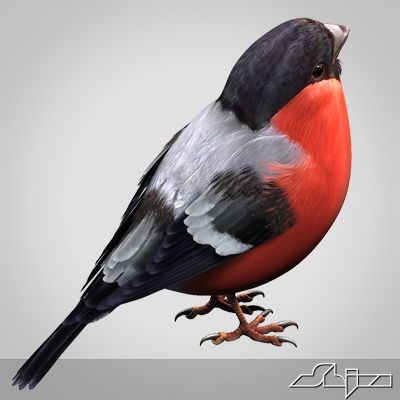


Eurasian Bullfinch 3D Model
1


0
visits

Submitted by
r189
Specifications
- Geometrypolygonal_quads only
- Polygons12,919
- Vertices18,716
- TexturesYes
- RiggedYes
- AnimatedYes
- 3D Printable ReadyNo
- Game Ready (low poly)No
- UV MappedYes
- Unwrapped UVsoverlapping
Description
Eurasian Bullfinch
Rigged and Animated for Lightwave 8.5 and up
Rigged and Animated for 3DS MAX 8 and up
MAX 2009 generated FBX
MAX 2017 generated FBX
Lightwave 2015 generated FBX
OBJ - includes base object and all morph target objs
The feathers are geometry so they render fast and no plugins are needed.
This model comes with several pre-animated scenes to get you started.
The wings are animated using the 3 bones within each. The wings are folded using one of several morph targets.
You can also make adjustments, like spreading the wing tip feathers and spreading the tail using morph targets.
-------------------------
The main controlling object is the "ROOT" bone
EABF-ZERO.lws' is the name given to my BASIC set up, no animation, but it is rigged.
I have provided several scene files to get you started:
EABF-FlyLoop.lws
EABF-LandTakeOff.lws
The feet and legs are controlled by "LT-FootController" and "RT-FootController" respectively (Lightwave)
The feet and legs are controlled by "LT-FootController" and "RT-FootController" respectively (3DS MAX)
There are two 'neck' bones, a 'head' bone and a 'lower beak' bone.
There are 18 Morph targets.
The 'Mouth' and phonemes are controlled by 9 Morph targets located when you select the mesh and go to "Object" => "Properties" => "Deform.(Lightwave)
The 'Mouth' and phonemes are controlled by Morph targets located when you select the EGF mesh and go to 'Modify' => 'Morpher'. (MAX)
The wings are controlled by 3 bones each
and have 5 Morph positions, including flapping and folded positions
WingFold-9a
WingFold-9g
WingTIpsDn
WingTIpsSpread-01
WingTIpsSpread-02
The Tail spread is controlled via Morph target TailClosed, the Tail bone controls position and rotation.
The eyes have several morph targets:
EyeBrowsMUP-LT
EyeBrowsMUP-RT
EyelidsClosed
The toes are controlled by 12 bones on each foot.
To fold the wings use the morphs noted above.
But if you have positioned the wings by moving the bones, AND you try to use morph targets to fold them, you WILL have some pretty weird distortions that will freak you out.
Don't panic, the solution is to 'zero' out your wing bone positions, as or just before you apply the 'Morph' targets.
-------------
If, after turning the modifiers 'TurboSmooth' and 'Morph' on and off a few times, while setting up your animation, you may find that points on the model are suddenly no longer attached to their bones.
Save what you are doing, close Max and then reopen Max. Reopen your scene and you should be fine.
Max gets sometimes lost when the modifiers are turned on and off.
-----------
The model is made hi resolution by using Sub-Patching, so the actual geometry is much less than the rendered geometry.
Both Models:
Eurasian Bullfinch:
Real Geometry:
18716 vertices
12919 polygons
--------------------------
the maps are RGB or greyscale, 72dpi and 200dpi, 2666px X 2666px
Sep 28, 2020
date added
Nov 03, 2025
last update
Reviews
There are currently no reviews for this product.
Why not be the first one to break the ice?