-->
ArchitectureVehiclesCharactersAircraftFurnitureElectronicsAnimalsPlantsWeaponsSportsFoodAnatomy
Bookmarked
Bookmark removed

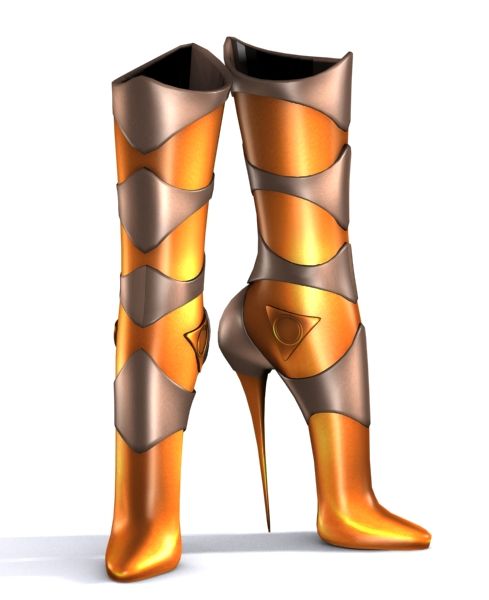
WG224 3D Model

0
WG224 royalty-free 3d model - Preview no. 1
WG224 royalty-free 3d model - Preview no. 2
WG224 royalty-free 3d model - Preview no. 3
WG224 royalty-free 3d model - Preview no. 4
WG224 royalty-free 3d model - Preview no. 5
WG224 royalty-free 3d model - Preview no. 6
WG224 royalty-free 3d model - Preview no. 1
WG224 royalty-free 3d model - Preview no. 2
WG224 royalty-free 3d model - Preview no. 3
WG224 royalty-free 3d model - Preview no. 4
WG224 royalty-free 3d model - Preview no. 5
WG224 royalty-free 3d model - Preview no. 6
10
00
Royalty Free LicenseEditorial Only
Simple returns
Best Price Guarantee
Works out of the box
42 visits
perfect wirefly

Specifications

  • Geometrypolygonal
  • Polygons10,000
  • Vertices10,000
  • TexturesYes
  • RiggedNo
  • AnimatedNo
  • 3D Printable ReadyNo
  • Game Ready (low poly)No
  • UV MappedYes
  • Unwrapped UVsnon-overlapping

Formats & Files

Collada
(.dae)
5 MB

WG224-L.dae
FBX
(.fbx)
1 MB

WG224-L.fbx
OBJ
(.obj)
3 MB

WG224-L.obj
(.unknown)

WG224-L.slm
Collada
(.dae)
5 MB

WG224-M.dae
FBX
(.fbx)
1 MB

WG224-M.fbx
OBJ
(.obj)
3 MB

WG224-M.obj
(.unknown)

WG224-M.slm
Collada
(.dae)
5 MB

WG224-S.dae
FBX
(.fbx)
1 MB

WG224-S.fbx
OBJ
(.obj)
3 MB

WG224-S.obj
(.unknown)

WG224-S.slm
Collada
(.dae)
5 MB

WG224-X.dae
FBX
(.fbx)
1 MB

WG224-X.fbx
OBJ
(.obj)
3 MB

WG224-X.obj
(.unknown)

WG224-X.slm
Collada
(.dae)
5 MB

WG224-XX.dae
FBX
(.fbx)
1 MB

WG224-XX.fbx
OBJ
(.obj)
3 MB

WG224-XX.obj
(.unknown)

WG224-XX.slm

multiface map.jpg

occ.jpg
2 MB

outUV.jpg
2 MB

outUV.png

texture7.jpg

texture7DE.jpg

textures.jpg

textures1.jpg

textures2.jpg

textures3.jpg

textures4.jpg

textures5.jpg

textures6.jpg

WG224-L.mtl

WG224-M.mtl

WG224-S.mtl

WG224-X.mtl

WG224-XX.mtl

Description

fit second life,you could use it in another world,like inworldz etc. 1. High quality polygonal model 2. Model resolutions are optimized for polygon efficiency(in 3DS MAX the meshsmooth function can be used to increase mesh resolution if necessary). 3. all maps inside 4. Max models grouped for easy selection & objects are logically named for ease of scene management. 5. No cleaning up necessary, just drop model into your scene and start rendering. 6. No special plugin needed to open scene.
Oct 02, 2019 date added
Dec 07, 2021 last update

Reviews

There are currently no reviews for this product.
Why not be the first one to break the ice?