



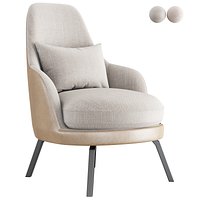


Sofá 2 modelo 3d
0


Licencia Libre de DerechosTodos los usos extendidos
Devoluciones simples
Mejor precio garantizado
Trabaja fuera de la caja
0
visitas

Presentado por
Jiri Tuhacek
Presupuesto
- Geometríasubdivision
- Poligonos189,954
- Vértices190,923
- TexturasYes
- AparejadoNo
- AnimadoNo
- Listo para imprimir en 3DNo
- Juego listo (polietileno baja)No
- Mapeado UVYes
- UV sin envolvermixed
Descripción
Sofa
Are you making a vizualisation of interior and don't have enough time to make all the furniture? Are you tired of alchemy with materials? This sofa is ready-to-render and will look stuning in your scene.
Technical info
This is one model of sofa with leather material. Everything is sorted, properly named, in the real-world-scale.
No Subdivision: 13 134 Verts., 12 960 Faces, 25 896 Tris.
Subd. 2 (Used for renders): 190 923 Verts., 189 954 Faces, 379 908 Tris.
Sorting of models
Models are on separate layers
Models are placed close to center
Models are true-to-scale
Logicaly named
Appending models
Open your own .blend
Go to File > Append
Go into models
Select model you want to append
Materials
Materials are leather and metal. There are two kinds of leather, but they differ only in color which is determined using color ramp. Color texture is turned into black/white and using color ramp you may do in any color you want. There are difuse, normal and spec textures included. The specularity map is heavily modified in node editor, but all you care about is the color ramp. Metal material is just basic - mixed difuse and glossy.
Properly named
Jun 25, 2020
Fecha Agregada
Sep 27, 2021
última actualización
Opiniones
Actualmente no hay opiniones para este producto.
¿Por qué no ser el primero en romper el hielo?