-->
ArquiteturaVeículosPersonagensAeronaveMobíliaEletrônicosAnimaisPlantasArmasEsportesComidaAnatomia
Marcado
Marcador removido

Canon EOS M6 Modelo 3D

0
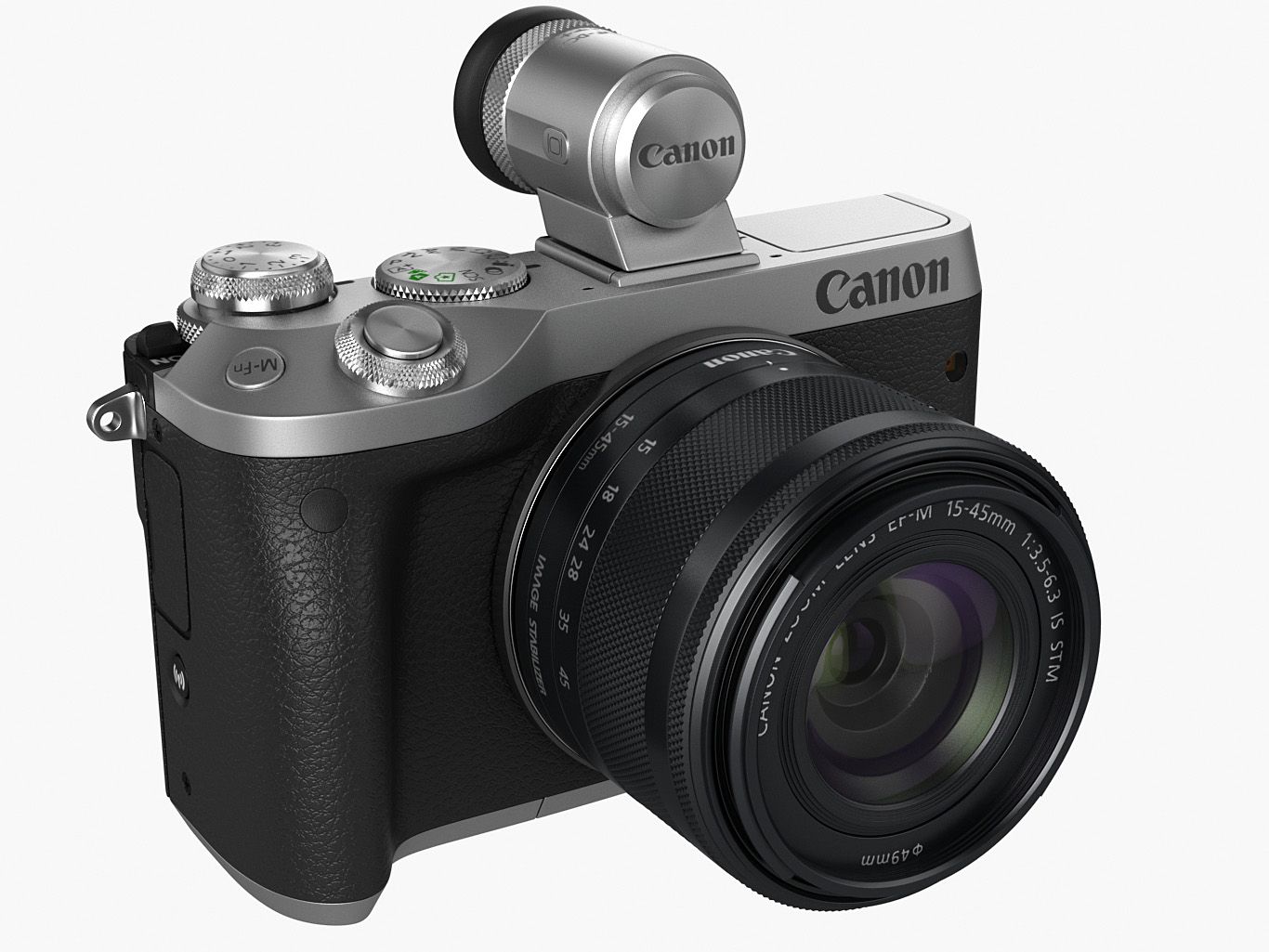
Canon EOS M6 royalty-free 3d model - Preview no. 1
Canon EOS M6 royalty-free 3d model - Preview no. 2
Canon EOS M6 royalty-free 3d model - Preview no. 3
Canon EOS M6 royalty-free 3d model - Preview no. 4
Canon EOS M6 royalty-free 3d model - Preview no. 5
Canon EOS M6 royalty-free 3d model - Preview no. 6
Canon EOS M6 royalty-free 3d model - Preview no. 7
Canon EOS M6 royalty-free 3d model - Preview no. 8
Canon EOS M6 royalty-free 3d model - Preview no. 9
Canon EOS M6 royalty-free 3d model - Preview no. 10
Canon EOS M6 royalty-free 3d model - Preview no. 11
Canon EOS M6 royalty-free 3d model - Preview no. 12
Canon EOS M6 royalty-free 3d model - Preview no. 13
Canon EOS M6 royalty-free 3d model - Preview no. 14
Canon EOS M6 royalty-free 3d model - Preview no. 15
Canon EOS M6 royalty-free 3d model - Preview no. 16
Canon EOS M6 royalty-free 3d model - Preview no. 17
Canon EOS M6 royalty-free 3d model - Preview no. 18
Canon EOS M6 royalty-free 3d model - Preview no. 19
Canon EOS M6 royalty-free 3d model - Preview no. 20
Canon EOS M6 royalty-free 3d model - Preview no. 21
Canon EOS M6 royalty-free 3d model - Preview no. 1
Canon EOS M6 royalty-free 3d model - Preview no. 2
Canon EOS M6 royalty-free 3d model - Preview no. 3
Canon EOS M6 royalty-free 3d model - Preview no. 4
Canon EOS M6 royalty-free 3d model - Preview no. 5
Canon EOS M6 royalty-free 3d model - Preview no. 6
Canon EOS M6 royalty-free 3d model - Preview no. 7
Canon EOS M6 royalty-free 3d model - Preview no. 8
Canon EOS M6 royalty-free 3d model - Preview no. 9
Canon EOS M6 royalty-free 3d model - Preview no. 10
Canon EOS M6 royalty-free 3d model - Preview no. 11
Canon EOS M6 royalty-free 3d model - Preview no. 12
Canon EOS M6 royalty-free 3d model - Preview no. 13
Canon EOS M6 royalty-free 3d model - Preview no. 14
Canon EOS M6 royalty-free 3d model - Preview no. 15
Canon EOS M6 royalty-free 3d model - Preview no. 16
Canon EOS M6 royalty-free 3d model - Preview no. 17
Canon EOS M6 royalty-free 3d model - Preview no. 18
Canon EOS M6 royalty-free 3d model - Preview no. 19
Canon EOS M6 royalty-free 3d model - Preview no. 20
Canon EOS M6 royalty-free 3d model - Preview no. 21
Retornos simples
Melhor Preço Garantido
Trabalha fora da caixa
0 visitas
fisherman3d

Especificações

  • Geometriapolygonal
  • Polígonos70,000
  • Vértices70,000
  • TexturasYes
  • RiggedNo
  • AnimadoNo
  • Pronto para impressão em 3DNo
  • Jogo pronto (baixo poli)No
  • Mapeado por UVYes
  • UVs não enroladosmixed

Formatos e Arquivos

3DS
(.3ds)
5 MB

CanonEOS_M6_3ds.rar
Cinema 4D
(.c4d)
1 MB

CanonEOS_M6_c4d.rar
FBX
(.fbx)
22 MB

CanonEOS_M6_fbx.rar
Lightwave
(.lwo)

CanonEOS_M6_lwo.rar
3ds Max
(.max)
81 MB

vray Mental Ray
CanonEOS_M6_max.rar
OBJ
(.obj)
13 MB

CanonEOS_M6_obj.rar
(.unknown)
75 MB

CanonEOS_M6_tex.rar

Descrição

Detailed and textured model of Canon EOS M6 digidal camera with lens and viewfinder. - every object has material's name, you can easily change or apply materials .max format: Rar archive contains three scenes 1. 3ds max 2011 with vray materials, which you can see in preview images studio renders (white background). Lighting and render setup included. 2. 3ds max 2011 with mental ray materials (blue background). Lighting and render setup included. 3. 3ds max 2011 with simple standard scanline materials Just put into your scene and render! In each scene model is provided with mesh smooth modifier on stack on objects that need it. Mesh smooth is set 1 or 2 for renders. Body, lenses and display are in different layers. .obj format: Rar archive contains two versions of model: 1. Exported without collapsing after mesh smooth. Low or med poly mesh which you can see in preview images, good if you need to edit model. 2. Exported after appllying mesh smooth. Just import, apply materials and render Simple materials, textures may have to be added manually. . .lwo, c4d format: Rar archive contains model exported without collapsing after mesh smooth. Low or med poly mesh which you can see in preview images, good if you need to edit model. Simple materials, textures may have to be added manually. In Cinema 4D some elements may have to be optimized. . .fbx and .3ds format: Rar archive contains model exported after appllying mesh smooth. Just import, apply materials and render. Simple materials, textures may have to be added manually. . . Polycount: without meshsmooth max,obj,lwo,xsi,c4d: 70 000 polygons collapsed fbx,3ds,obj: 870 000 faces/ 470 000 polygons
Sep 17, 2020 data adicionada
May 19, 2025 última atualização

Rever

Atualmente não há comentários para este produto.
Por que não ser o primeiro a quebrar o gelo?