-->
ArchitectureVehiclesCharactersAircraftFurnitureElectronicsAnimalsPlantsWeaponsSportsFoodAnatomy
Bookmarked
Bookmark removed

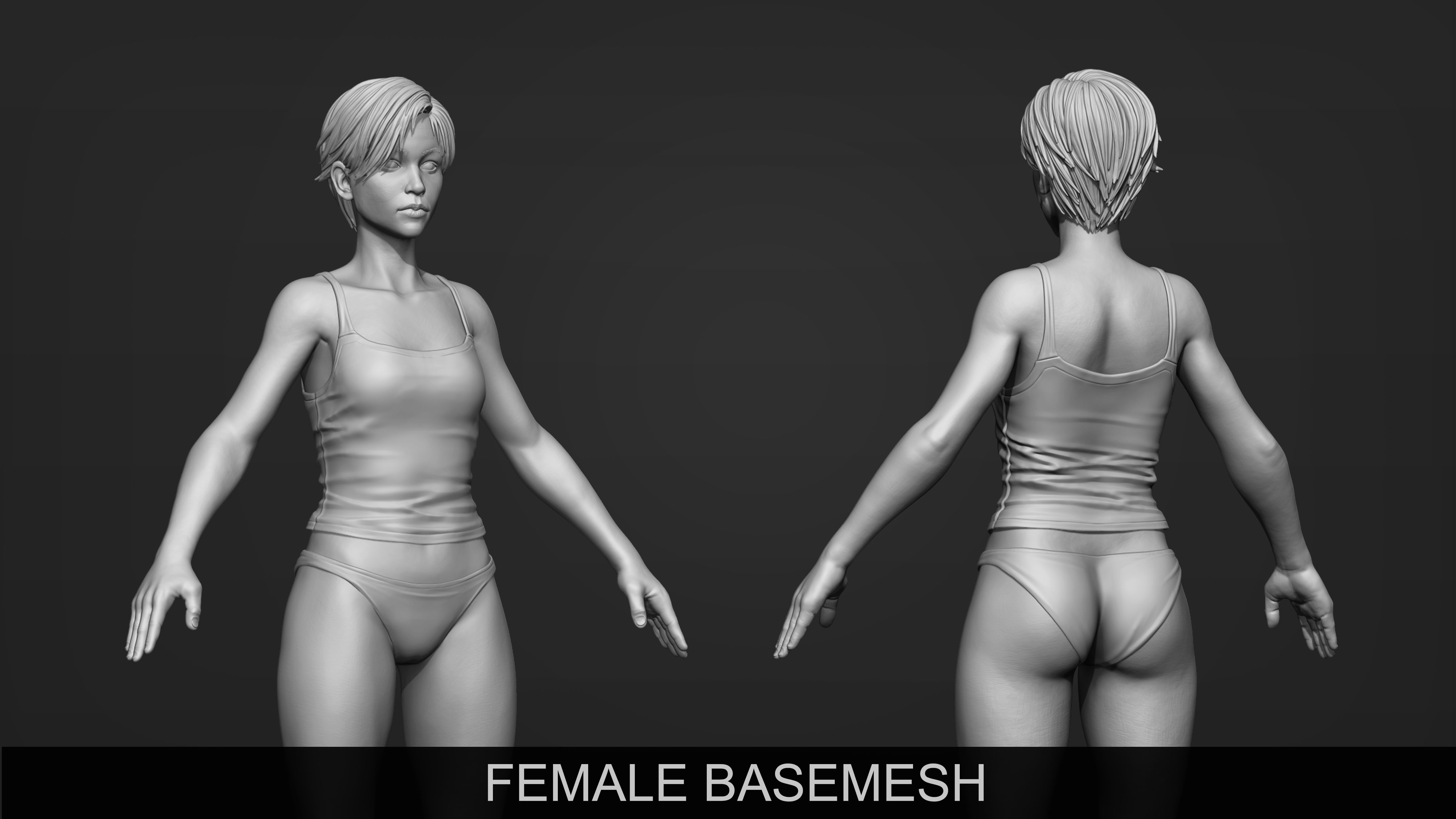
Rigged and Animated Female Base Mesh 3D Model

1
Rigged and Animated Female Base Mesh royalty-free 3d model - Preview no. 1
Rigged and Animated Female Base Mesh royalty-free 3d model - Preview no. 2
Rigged and Animated Female Base Mesh royalty-free 3d model - Preview no. 3
Rigged and Animated Female Base Mesh royalty-free 3d model - Preview no. 4
Rigged and Animated Female Base Mesh royalty-free 3d model - Preview no. 5
Rigged and Animated Female Base Mesh royalty-free 3d model - Preview no. 6
Rigged and Animated Female Base Mesh royalty-free 3d model - Preview no. 7
Rigged and Animated Female Base Mesh royalty-free 3d model - Preview no. 8
Rigged and Animated Female Base Mesh royalty-free 3d model - Preview no. 9
Rigged and Animated Female Base Mesh royalty-free 3d model - Preview no. 10
Rigged and Animated Female Base Mesh royalty-free 3d model - Preview no. 11
Rigged and Animated Female Base Mesh royalty-free 3d model - Preview no. 12
Rigged and Animated Female Base Mesh royalty-free 3d model - Preview no. 13
Rigged and Animated Female Base Mesh royalty-free 3d model - Preview no. 14
Rigged and Animated Female Base Mesh royalty-free 3d model - Preview no. 1
Rigged and Animated Female Base Mesh royalty-free 3d model - Preview no. 2
Rigged and Animated Female Base Mesh royalty-free 3d model - Preview no. 3
Rigged and Animated Female Base Mesh royalty-free 3d model - Preview no. 4
Rigged and Animated Female Base Mesh royalty-free 3d model - Preview no. 5
Rigged and Animated Female Base Mesh royalty-free 3d model - Preview no. 6
Rigged and Animated Female Base Mesh royalty-free 3d model - Preview no. 7
Rigged and Animated Female Base Mesh royalty-free 3d model - Preview no. 8
Rigged and Animated Female Base Mesh royalty-free 3d model - Preview no. 9
Rigged and Animated Female Base Mesh royalty-free 3d model - Preview no. 10
Rigged and Animated Female Base Mesh royalty-free 3d model - Preview no. 11
Rigged and Animated Female Base Mesh royalty-free 3d model - Preview no. 12
Rigged and Animated Female Base Mesh royalty-free 3d model - Preview no. 13
Rigged and Animated Female Base Mesh royalty-free 3d model - Preview no. 14
Royalty Free LicenseAll extended uses
Simple returns
Best Price Guarantee
Works out of the box
0 visits
Lurisay

Specifications

  • Geometrypolygonal
  • Polygons109,018
  • Vertices108,856
  • TexturesNo
  • RiggedYes
  • AnimatedYes
  • 3D Printable ReadyNo
  • Game Ready (low poly)No
  • UV MappedYes
  • Unwrapped UVsnon-overlapping

Formats & Files

3DS
(.3ds)

FBM_02_3DS.rar
Collada
(.dae)
1 MB

FBM_02_Collada.rar
FBX
(.fbx)
1 MB

FBM_02_FBX.rar
3ds Max
(.max)
3 MB

default_scanline
FBM_02_Max_2013.rar
OBJ
(.obj)

FBM_02_OBJ.rar
Collada
(.dae)
1 MB

FBM_Walk_Anim_Collada.rar
FBX
(.fbx)
1 MB

FBM_Walk_Anim_FBX.rar
3ds Max
(.max)
1 MB

default_scanline
FBM_Walk_Anim_Max2013.rar

Description

Rigged and Animated Female Base Mesh 3D model This is improved 3d model of my Female Base Mesh which published long before. - As you can see in the presentation images 3d object has a clean topology. - By this model you don't have to spend your time to create a clean UV map for your 3D character. This job is already done! You can pass through painting process directly. Or just make adjustments on 3d model and re create a new UV map by its own splitted unwrapped pieces in a few seconds. -In 3ds Max file the scene has layers for each group of objects created for different purpose. Beside that each object has an unique individual name. - There are many 3d objects in the market like this one but none of them had been rigged like mine. By this rigged 3d model you don't have to waste your time to create your desired gesture for your characters. Freeze FBM Mesh layer in the layer manager of 3d max file. Select the bone you want to re pose then rotate on local axes of the object. Repeat that until you are on the proper position for each bones. -Simple skinning may not give you the desired result of the object when you try to rotate bones for extreme angle. In 3d max there is Skin Morph modifier which you adjust the shape of mesh on a specific angle of selected bone. I created six different meshes for such situations and defined them to Skin Morph modifier. Morph targets are included in 3d Max file. To see them just make it visible of their layer by using layer manager. -Also there is simple walk animation I did created on forty frame sequences. -FBX, Collada, OBJ, 3DS are additional file types are created through 3ds Max 2013. Simple walk animation is included in their FBX and collada files. Thanks.
Jul 15, 2020 date added
Aug 11, 2025 last update

Reviews

There are currently no reviews for this product.
Why not be the first one to break the ice?